Skip to content

Sales, inventory & reports

Take payment, track stock and see what's working.

da Salon Partner is salon POS software that handles checkout, split and partial payments, refunds and invoices alongside your stock and reports. Low-stock alerts, purchase orders and six report areas show what sold, what to reorder and where each venue stands.

  • Front desk and cashiers

  • Inventory and purchasing teams

  • Owners and finance

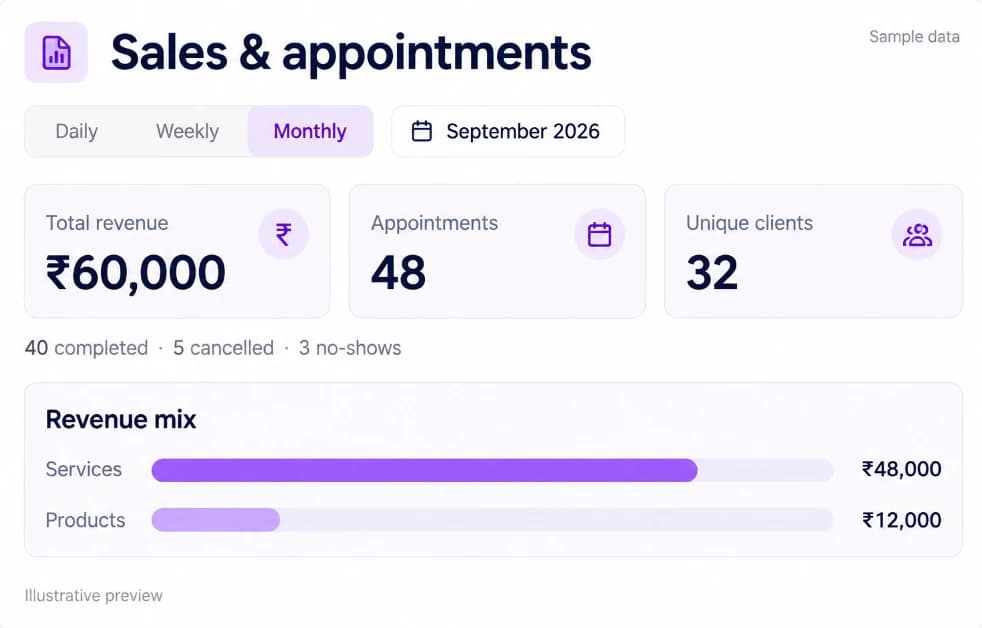
Sample Sales & appointments report in da Salon Partner showing total revenue, appointments, unique clients and the revenue mix.

sales categories, plus an All Sales view

5

inventory areas, from Stock to Stock transfers

6

report areas, from General to Product

6

invoice print formats: A4 and thermal

2

Sales & checkout

Salon POS software for every kind of sale

Ring up services, products, packages, memberships and gift cards in one cart, then find each sale again under All Sales or its own category. Client & Sales settings decide how strict checkout is for your team.

  • Split and partial paymentsTake part cash and part card, add your own payment methods, or save a sale as unpaid or part-paid and collect the rest later.

  • Refunds and voidsRefund by amount or by item, choose whether returned products go back into stock, and void a sale when needed. Role Groups decide who can do either.

  • Invoices clients can keepShare or download a PDF invoice, or print an A4 or thermal copy at the counter.

  • Tax set up your wayCreate tax rates with their own names and percentages, and choose a default rate for services.

  • Checkout rules and tipsRequire a client on every sale, ask for a client OTP before checkout completes, and split tips between staff.

  • All Sales
  • Services
  • Products
  • Packages
  • Memberships
  • Gift cards
  • Tax Settings
Read the guide in the help centre
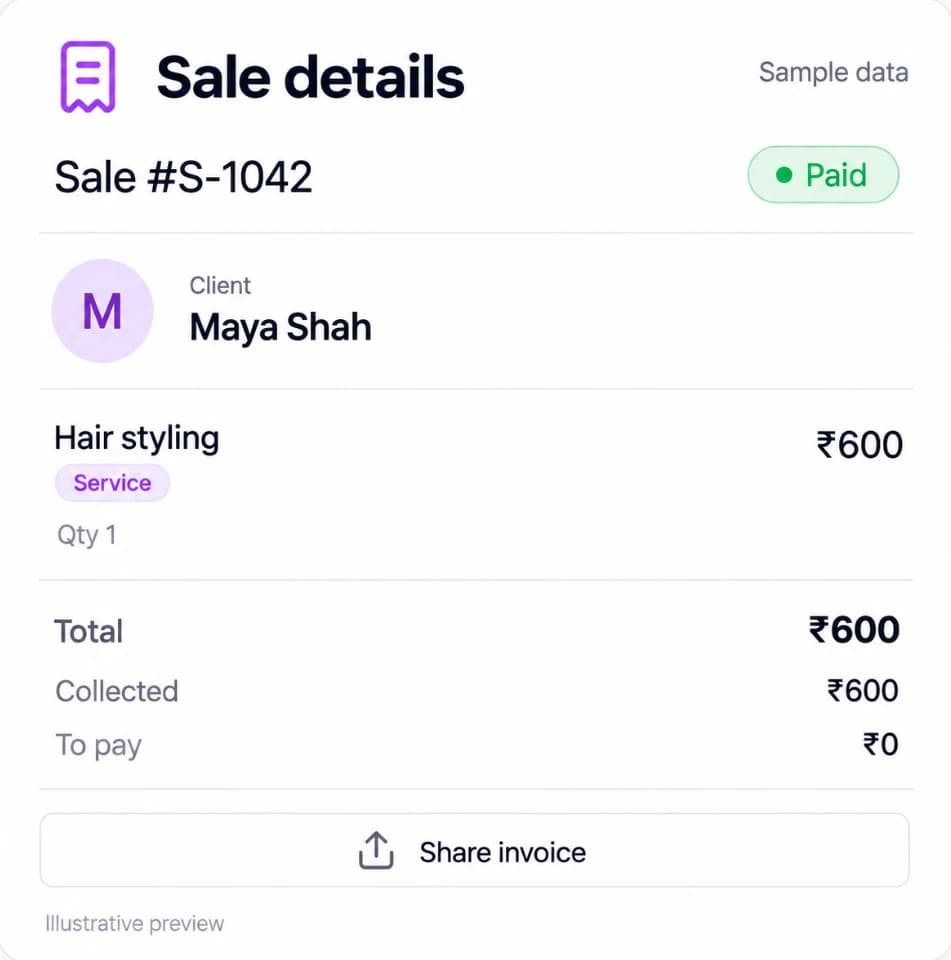
Sample sale details in da Salon Partner with the client, a hair styling service, the amount collected and a Share invoice button.

Payments & payouts

Salon billing software that tracks every payment

Payment Transactions lists the money that moves through da Salon online, from online sales to refunds and payouts. Balance & Bank Details shows each venue's balance and the bank account it pays out to.

  • Every online transaction in one listFilter sales, gift card, membership and package purchases, refunds and payouts by type, with the status, amount and payment gateway on each row.

  • Venue balancesSee the balance held for each venue next to your total, with recent activity such as transfers and withdrawals.

  • Payouts to your bankAttach a verified bank account to receive payouts and make withdrawals.

  • Clear fee wordingWalk-in payments go straight to your venue with no platform fee or MDR. Online prepayments are released after the service, less the MDR and a platform fee.

  • Payment Transactions
  • Balance & Bank Details
Read the guide in the help centre

Products & inventory

Salon inventory management software for retail and backbar

Products holds what you sell and use, with SKU or barcode, supply price and selling price. Inventory tracks stock at each venue, from purchase orders and stocktakes to transfers between branches.

  • Low-stock alerts per venueSet a low-stock level and reorder quantity for each venue, and the Dashboard lists products running low with a Re-order button.

  • Consumables that deduct themselvesLink backbar products to services, and stock is deducted automatically when those services are sold.

  • Purchase orders and suppliersRaise purchase orders to suppliers with unit costs and extra fees such as shipping, then receive delivered units into stock.

  • Stocktakes and stock transfersEnter a physical count to correct stock at a venue, and move products between venues with a stock transfer.

  • Orders from da Salon MarketProducts you buy on da Salon Market, included with your Partner account, can be added to your Partner inventory.

  • Products
  • Stock
  • Consumables
  • Suppliers
  • Purchase orders
  • Stocktakes
  • Stock transfers
Read the guide in the help centre

Dashboard & reports

Salon reports and sales tracking for every venue

The Dashboard shows appointments, sales, clients, reviews and revenue against the previous period. Reports go deeper across six areas, and the Monthly Sales Target tracks each venue against the goal you set.

  • Six report areasGeneral, Sales, Client, Staff, Appointment and Product reports cover revenue, payment methods, tax, commission, stock movement and more.

  • Monthly Sales TargetSet a monthly target per venue for services, products, packages, memberships and gift cards, and see whether each is At Risk, On Track or Above Target.

  • Lost value and prepaid balancesSee revenue lost to cancellations and no-shows, and the value still held on packages, memberships, gift cards and loyalty balances.

  • Peaks, trends and comparisonsFind your busiest days and time slots with the Appointment Heatmap, and compare two periods side by side in General reports.

  • Exports and report emailsExport most reports to a spreadsheet, and set up report emails for the business and for each venue.

  • Dashboard
  • Monthly Sales Target
  • General
  • Sales
  • Client
  • Staff
  • Appointment
  • Product
Read the guide in the help centre

Names, numbers and amounts in these previews are sample data.

How it fits your day

From the first sale to the month-end review.

Bookings, your team, sales and stock in one place, so the day runs to plan and the numbers add up at close.

  1. Check out at the counter

    Add services, products and offers to one cart, take split or partial payment and share the invoice.

  2. Keep stock current

    Linked consumables are deducted as services are sold, and low-stock products appear on the Dashboard ready to reorder.

  3. Review the day

    Check takings by payment method in the Transaction Summary, and see online payments in Payment Transactions.

  4. Review the month

    Compare each venue with its Monthly Sales Target, then use the six report areas to plan stock, staffing and offers.

Questions & answers

Sales, inventory & reports, answered.

Salon POS software for split payments, refunds, invoices and tax, plus low-stock alerts, purchase orders and six report areas for every venue.

Can’t find what you’re looking for?
Talk to our team

Get started with Partner

Close every sale and know your numbers.

Run checkout, stock and reports for every venue in da Salon Partner, with hands-on training for your team and no booking commission on appointments booked through da Salon.

  1. Register on da Salon Partner.
  2. Add your venue, services, staff, and hours.
  3. Start organising your appointments and daily operations.