Skip to content

Appointments & staff

Take bookings and plan your team from one calendar.

da Salon Partner is salon appointment booking software that puts online bookings, walk-ins and your team's shifts on one calendar. Set your own online booking rules, link services to the rooms they need, and track hours, tips and commission without a separate spreadsheet.

  • Front desk and reception

  • Salon and spa managers

  • Owners with one or many venues

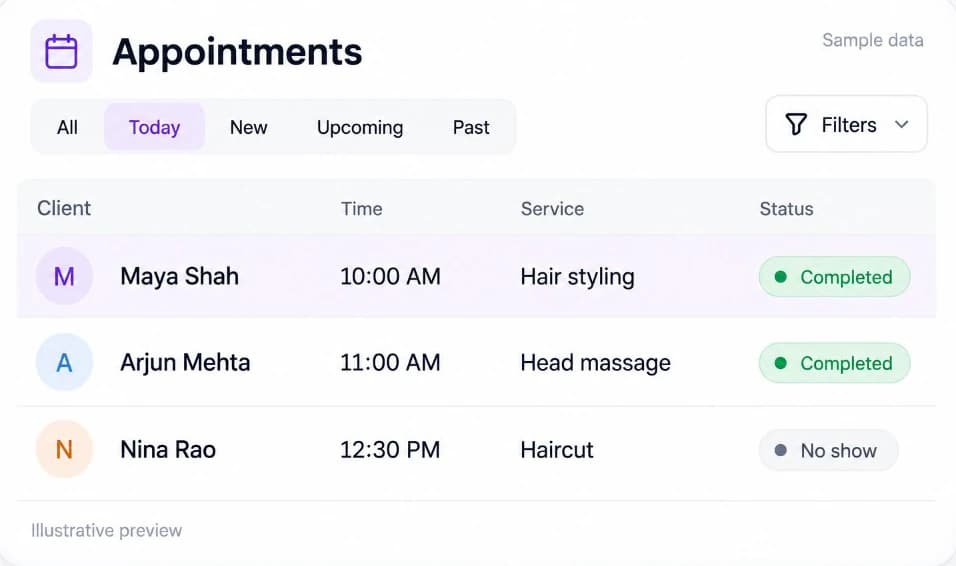
Sample Appointments list in da Salon Partner with All, Today, New, Upcoming and Past views, filters and a status for each booking.

dedicated areas: Calendar and Appointments

2

appointment views, from Today to Past

5

appointment statuses, from New to No Show

5

online availability profiles, Simple to Custom

4

Calendar & appointments

A salon calendar for every booking, online or walk-in

Calendar shows the day or week by team member, so the front desk sees who is available at a glance. Appointments lists the same bookings in All, Today, New, Upcoming and Past views, with filters for status, staff and dates.

  • Day and Week viewsFilter by venue, staff or status, and start a new appointment from any team member's column.

  • Drag to rescheduleMove a booking to a new time or another team member by dragging it. Partner asks before you book over a scheduling conflict.

  • Online and walk-in bookings togetherBookings clients make on dasalon.com, where online booking is enabled, sit on the same calendar as the walk-ins and calls your team adds.

  • A clear status for every visitMove bookings from New to Confirmed to Completed, mark no-shows, and record a reason whenever you cancel.

  • Check out from the bookingOpen an appointment to reassign staff, add a note, take payment and see the sale it created.

Online booking

A salon online booking system that follows your rules

Online Booking Settings decide what clients can book from your venue page: how much notice you need, how far ahead they can book and when they can still cancel. Closed periods and reminders keep the calendar accurate.

  • Lead time, booking window and slot intervalHide slots that start too soon, open bookings one to six months ahead, and set the step between start times, such as every 15 minutes.

  • Cancellation and rescheduling rulesChoose how close to the start time clients can cancel or reschedule online, and cap how many times they can move the same booking.

  • Slots built from real availabilityChoose Simple, Roster, Full or Custom so online slots respect opening hours, shifts and capacity, and auto-assign a stylist when the client has no preference.

  • Closed periodsBlock bookings for holidays, training days or events, and the calendar shows the venue as closed for those dates.

  • Reminders and service-due nudgesSend appointment confirmations and reminders on WhatsApp where enabled on your account, and set Service due reminder days for each service sub-category.

  • Online Booking Settings
  • Closed periods
  • Service due reminder
Read the guide in the help centre

Staff & shifts

Salon staff management, rotas and commission in one place

Members holds each person's profile, venues and usual hours. Shifts plans the week, Timesheets records the hours actually worked, and Role Groups decide what each login can see and do.

  • Shifts and time offAdd one-off shifts or repeating shift patterns, and record approved time off. Online bookings are blocked while someone is away.

  • Timesheets and attendanceSee who is in, on a break, done or late today. Clock-ins, breaks and clock-outs feed each person's paid hours.

  • Role Groups and permissionsSet each module to No access, View only or Full access, limit staff to their own or today's clients, and hide client contact details.

  • Commission and tipsSet each person's commission rate for services, products, packages and memberships, and split tips between staff at checkout.

  • Staff reportsReview working hours, commission, time off, reviews and appointments for each team member.

  • Members
  • Timesheets
  • Shifts
  • Role Groups
Read the guide in the help centre

Services & resources

Services, bundles and resources for accurate salon scheduling

Your service menu decides what clients can book and how long each visit blocks the calendar. Set durations and prices, choose who performs each service, and link treatments to the rooms, chairs or beds they need.

  • Durations, prices and taxGive each service a duration, a price and a tax rate, then choose whether it is open for online booking, walk-in sales or both.

  • Staff-specific pricesAssign the team members who perform a service and set a different price for each of them where needed.

  • BundlesGroup two or more services into a bundle with its own price and savings, bookable online or at the front desk.

  • Rooms, chairs and equipmentAdd resources as single-client or shared, give them opening hours, and set which services need them so bookings respect what is available.

  • Import your menuMoving from a spreadsheet or another system? Import services from a file instead of adding them one by one.

  • Services
  • Bundles
  • Resources
Read the guide in the help centre

Names, numbers and amounts in these previews are sample data.

How it fits your day

From the first booking to the last checkout.

Bookings, your team, sales and stock in one place, so the day runs to plan and the numbers add up at close.

  1. Set the rules once

    Add services, staff hours and resources, then choose your online booking rules and closed periods.

  2. Bookings fill the calendar

    Online bookings from your dasalon.com page sit next to walk-ins and calls, each with a status the whole team can see.

  3. Run the day

    Drag bookings when plans change, reassign staff, and check Timesheets for who is in, on a break or late.

  4. Close and review

    Check out each visit, then review appointments, value lost to no-shows and staff hours in Reports.

Questions & answers

Appointments & staff, answered.

Salon appointment booking software for online and walk-in bookings, shifts, timesheets and commission on one calendar, with no booking commission.

Can’t find what you’re looking for?
Talk to our team

Get started with Partner

Fill the calendar and keep the team in step.

Set up services, staff and booking rules in da Salon Partner, with hands-on training for your team and no booking commission on appointments booked through da Salon.

  1. Register on da Salon Partner.
  2. Add your venue, services, staff, and hours.
  3. Start organising your appointments and daily operations.