Skip to content

Marketing & promotions

Salon marketing that brings new clients in and regulars back.

da Salon Partner puts salon marketing software in the same login as your bookings and billing. Run local Instagram and Facebook ads, send WhatsApp campaigns to the right clients, design posts and flyers, share booking links and QR codes, and, where enabled, price quiet hours to sell.

  • Owners without a marketing team

  • Managers filling quiet weekday slots

  • Multi-venue brands running local campaigns

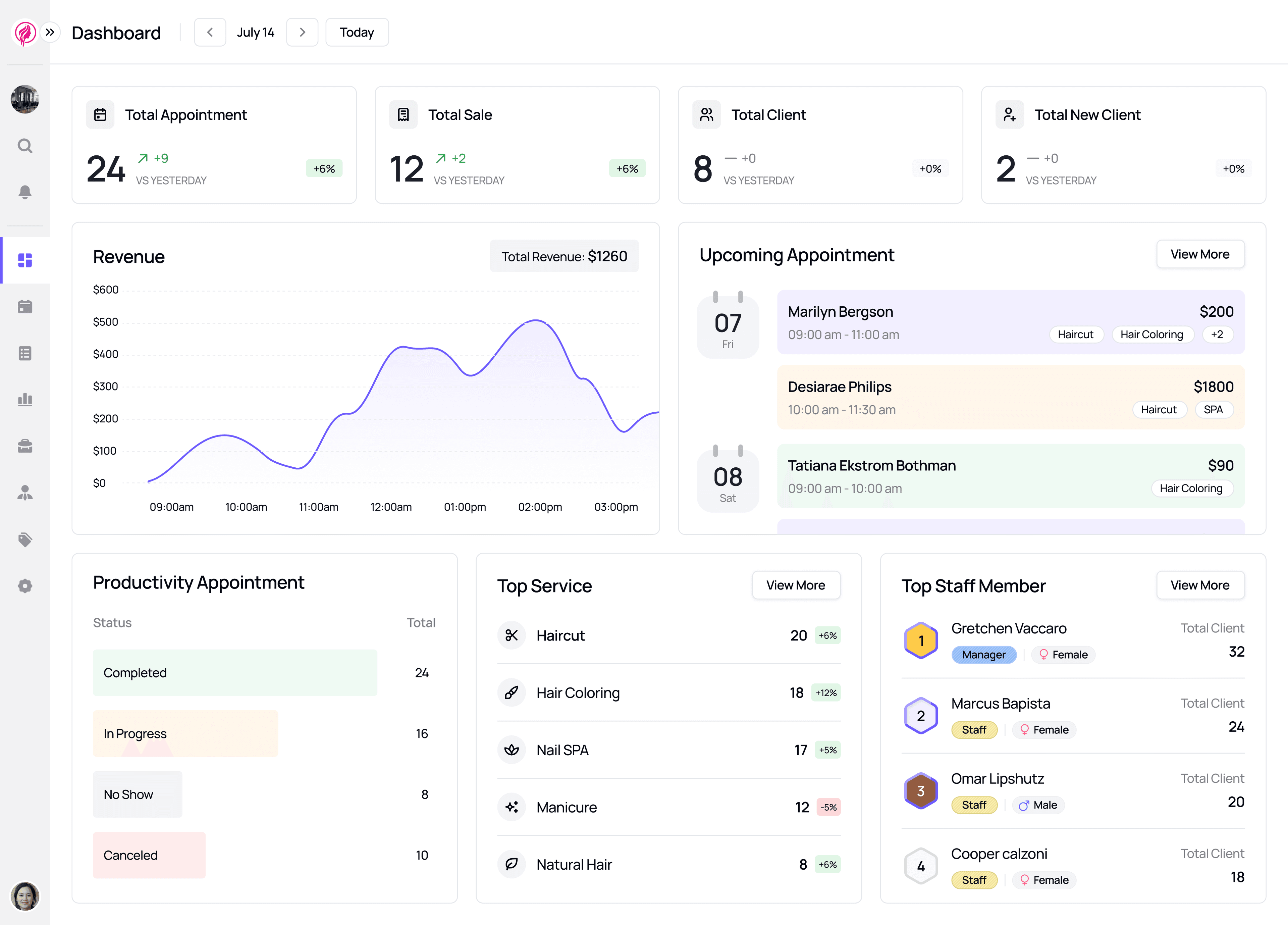
Sample da Salon Partner dashboard with appointment, sales and client totals, a revenue graph, upcoming appointments and top services.

Promote tools, from Get Featured to Easy Share

5

ready-made ad playbooks in Ads Manager

7

ad goals: bookings, messages, leads, services

4

ways to choose who gets a WhatsApp campaign

3

Ads Manager

Instagram and Facebook ads for salons, without an agency

Ads Manager runs local Meta campaigns from inside Partner. Start from a playbook or build a custom ad, choose who sees it and what it costs per day, then follow each lead until it becomes a booking.

  • Seven ready-made playbooksFill Empty Midweek Slots, New Client Welcome Pass, 1-Click Instagram Reel Boost and four more arrive with a goal, audience, duration and budget filled in for you to edit.

  • The result you want, where you want itChoose Get bookings, Get messages, Get leads or Show services, and run on Instagram, Facebook or both, across Feed, Stories and Reels.

  • Local reach on a daily budgetSet a radius around your venue, an age range and gender, a start date, duration and daily budget, and see the full fee breakdown before you pay.

  • Every lead in one pipelineInstant Form leads land in Leads with name and phone; move each from New Lead to Contacted, Follow-up, Appointment Booked or Converted, link it to a client, or export to CSV.

  • Results for every campaignOpen a campaign to see reach, impressions, taps, booking page opens and leads, with a daily trend and a split by platform, age and gender.

  • Ads Manager
  • Leads
  • Social Accounts
Read the guide in the help centre
Sample ad photo for a summer hair spa offer: a client with a soft updo in a lavender spa setting.

Creative Studio

Salon promotion ideas, turned into ready-to-post designs

Creative Studio gives you templates for services, packages, memberships, gift cards, promo codes and special occasions. Edit them in the browser, then download files sized for Instagram, Facebook, WhatsApp or print.

  • Templates for what you're promotingFilter by business type and by purpose, from a single service or package to a voucher, membership, gift card, promo code or festive occasion.

  • Edit without a designerChange text, fonts, colours and backgrounds, add your own photos, shapes and items from the Assets library, and remove a photo's background in the editor.

  • Sized for posts, stories and printStart from Instagram Post, Instagram Story or Facebook Post sizes, then download a social JPG, a PNG, a sharper 2× PNG or a high-resolution file for flyers.

  • Your designs, keptChanges save automatically, and Recent Designs keeps past creatives, so last Diwali's post becomes the starting point for this year's.

  • Creative Studio
  • Recent Designs
Read the guide in the help centre

Message Center

WhatsApp marketing for salons, aimed at the right clients

Message Center sends WhatsApp template messages from the venue you choose to the clients you choose. Pick clients by hand, reuse a saved audience, or let smart filters find them from visit, offer and review history.

  • Smart filters from real historyTarget tags such as 60 days no appointment, One-Time Client, Regular Clients 3+ visits, Never Used Membership or 5-Star Reviewer, and narrow by gender.

  • Saved audiencesBuild named audiences, such as VIP clients, add people straight from your client list, and reuse the same audience for the next campaign.

  • Automated messagesSwitch automated WhatsApp messages for appointments, sales, reviews and reminders on or off, template by template, where WhatsApp automations are enabled on your account.

  • Credits you can seeMessages use WhatsApp credits charged on delivery; check your balance before you send, and see total reach and credits used for each campaign.

  • Message Center
  • Automated
  • Campaigns
  • Audiences
Read the guide in the help centre

Easy Share

A salon booking link and QR code for every offer

Easy Share turns selected services, a membership or a gift card into a link and QR code you can post on Instagram, send on WhatsApp or print for the front desk, so clients go straight to what you are promoting.

  • Links for what you sellCreate an Easy Share for chosen services or bundles, a membership or a gift card, give it a name and description, and pick the venue it belongs to.

  • Copy the link or print the QRCopy the link in one tap for WhatsApp and Instagram, or download a QR poster for the reception desk, mirrors and counters.

  • One QR for every venueThe Partner Venues Link gives multi-venue brands a single link and QR code that opens your full list of venues.

  • Booking links on social and GoogleStep-by-step guides in Settings › Integrations show where to add your booking link on your Instagram bio, Facebook page and Google Business Profile.

  • Easy Share
  • Instagram Booking
  • Facebook Booking
  • Google Business
Read the guide in the help centre

Smart Pricing

Peak and off-peak pricing inside your salon marketing software

Smart Pricing raises or lowers catalogue prices by day and time, so a quiet Tuesday afternoon can carry an off-peak price and a busy Saturday a peak one. It is available where enabled on your account.

  • Rules by day and timePick the applicable days and a start and end time, then choose Surge (Raise) or Off-Peak (Lower) by a percentage or a fixed amount.

  • Only the services and staff you chooseEach rule applies to one venue and to the services and team members you select, so the rest of your menu keeps its usual price.

  • Online, walk-in or bothAdjust prices automatically for online bookings, and let staff apply the same rule on the calendar and at POS for walk-ins.

  • Pause it for laterSet a rule to Paused to keep it saved without applying it, and switch it back to Active when the quiet season returns.

  • See what it bookedSmart pricing shows the number and value of smart-priced appointments for the period you pick, for one venue or all of them.

  • Settings
  • Smart pricing
Read the guide in the help centre

Names, numbers and amounts in these previews are sample data.

How it fits your week

From a quiet Tuesday to a fuller book.

Reach new clients, fill quiet hours and turn great visits into reviews, without a separate marketing tool.

  1. Spot the gap

    Check the calendar and reports for quiet days, clients who haven't been back in 60 days and offers that have gone unused.

  2. Pick the right tool

    Use a midweek ad playbook or, where enabled, Smart Pricing for slow slots, a WhatsApp campaign for lapsed clients and an Easy Share link for a new offer.

  3. Make it look right

    Design the post, story or flyer in Creative Studio and download it for Instagram, WhatsApp or the front desk.

  4. Follow it to the booking

    Work ad leads through to Converted, check reach and credits used, and see smart-priced appointments in the same account your bookings land in.

Questions & answers

Marketing & promotions, answered.

Salon marketing software in da Salon Partner: run local Instagram ads, send WhatsApp campaigns, design posts and share booking links from one login.

Can’t find what you’re looking for?
Talk to our team

Get started with Partner

Market your salon from the place you run it.

Ads, WhatsApp campaigns, designs, booking links and pricing rules sit next to your calendar and client records. Ask the team about a da Salon Partner subscription, with no booking commission.

  1. Register on da Salon Partner.
  2. Add your venue, services, staff, and hours.
  3. Start organising your appointments and daily operations.