Skip to content

Online visibility & reviews

Get found online and take bookings with no booking commission.

da Salon Partner gives every venue a salon listing and online booking page on dasalon.com, with no booking commission on appointments booked through da Salon. Keep the profile current, add Get Featured placements, work towards a Trusted Badge and answer every review from one account.

  • Owners claiming an existing listing

  • Salons, spas and clinics new to online booking

  • Multi-venue brands building local reviews

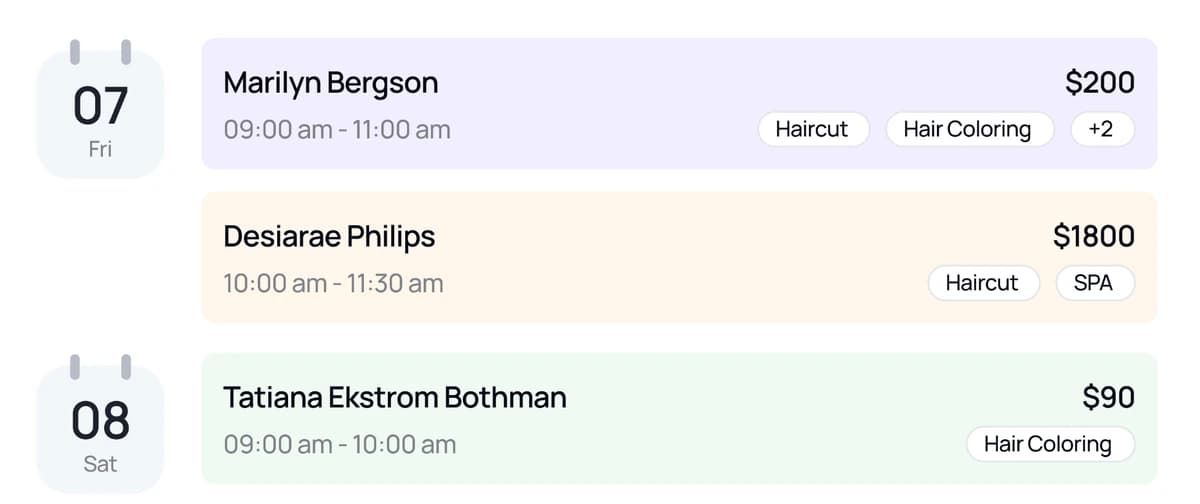
Sample Partner dashboard card listing upcoming appointments with client names, times, services and amounts.

booking-link guides: Instagram, Facebook, Google Business Profile

3

weeks per Get Featured placement, venue by venue

1–4

review sources, each linked to its appointment or sale

2

review reports: Client Reviews and Staff Reviews

2

Your dasalon.com profile

Your salon listing and online booking page on dasalon.com

Every da Salon Partner venue gets a profile on dasalon.com, the da Salon marketplace where clients compare services, offers, team, hours and reviews. Enable online booking and clients can book from that page, with no booking commission on those appointments.

  • A profile built from PartnerYour name, photos, description, map pin, opening hours and amenities come from Venues, and your services, packages, memberships and gift cards from your catalogue and offers.

  • Booking on your termsOnline Booking Settings set cancellation and rescheduling rules, the booking window, time slots and staff auto-assignment, and clients book online only where you enable it.

  • One calendar for every bookingAppointments booked on dasalon.com land in Calendar and Appointments beside walk-ins and phone bookings, so the front desk works from a single list.

  • Pay at the salon or onlineClients pay at the venue, or online where you enable it; online prepayments are released to you after the service, less MDR and a platform fee.

  • Claim a listing that already existsIf your salon already appears on dasalon.com, claim it at www.dasalon.com/partner with a one-time code sent to the salon phone number on the listing.

  • Venues
  • Online Booking Settings
  • Calendar
Read the guide in the help centre

Trusted Badge

Earn a Trusted Badge for every venue you run

Trusted Badge is a venue-level programme. When a venue meets the goals shown on your Dashboard, it earns a Trusted label and visibility treatment on dasalon.com. It never guarantees bookings, revenue or ranking.

  • Goals on your DashboardThe Trusted Badge card shows each goal, your progress and how many are complete for the selected venue, with the detail one click away.

  • Catalogue and monthly goalsGoals cover a complete catalogue, such as services, packages and memberships, plus monthly appointments, completed sales and client reviews.

  • Earned per venue, every monthEach venue is tracked on its own, and once it is trusted the card moves to next month's goals so you can keep the label.

  • Only completed activity countsCancelled appointments and refunded sales don't count, and the goals on screen always reflect the current programme rules for your country.

  • Dashboard
  • Trusted Badge
Read the guide in the help centre

Reviews & Google

Salon reviews, replies and Google tools in one place

Reviews gathers what clients say after an appointment or a purchase, so you can reply, open the visit behind each review and report anything that breaks policy. Google tools are available where enabled on your account.

  • Every review tied to a visitEach review is linked to its appointment or sale, so you can open the client, the appointment or the sale before you reply.

  • Reply, filter and reportWrite a reply, filter by rating, date, client or comment, and report a review with a reason when it breaks policy.

  • Reviews in your daily routineThe Latest Reviews card on the Dashboard shows new feedback, and the Client Reviews and Staff Reviews reports show ratings by client and by team member.

  • Reserve with GoogleWhere enabled on your account, link each venue's Google Place ID and choose which online services clients can book from Google Search and Maps.

  • Google Review BoostWhere enabled on your account, invite clients to leave a Google review after their visit, with a cooldown so no one is asked too often.

  • Reviews
  • Latest Reviews
  • Reserve with Google
  • Google Review Boost
Read the guide in the help centre

Names, numbers and amounts in these previews are sample data.

How it fits your week

From the first search to the next review.

Reach new clients, fill quiet hours and turn great visits into reviews, without a separate marketing tool.

  1. Claim or complete your profile

    Claim your existing listing at www.dasalon.com/partner, or set up your venue's photos, hours, services and offers in Partner.

  2. Decide how clients book

    Set cancellation rules, the booking window and time slots in Online Booking Settings, then add your booking link to Instagram, Facebook and Google.

  3. Raise your visibility

    Add a Get Featured placement before a busy season and work through each venue's Trusted Badge goals on the Dashboard.

  4. Answer every review

    Check Latest Reviews each morning, reply from Reviews, and report anything that breaks policy.

Questions & answers

Online visibility & reviews, answered.

Your salon listing and online booking page on dasalon.com, with no booking commission. Claim your listing, get featured and answer every review.

Can’t find what you’re looking for?
Talk to our team

Get started with Partner

Be easy to find and easy to book.

Claim or complete your dasalon.com profile, choose how clients book and answer reviews from the account you run the salon on, with no booking commission on appointments booked through da Salon.

  1. Register on da Salon Partner.
  2. Add your venue, services, staff, and hours.
  3. Start organising your appointments and daily operations.